EDR Detection Engines
Defender (and any modern EDR) has 4 different analysis engines, i.e. different mechanisms to catch your malware: Signature, Sandbox, Memory, Behaviour These are sparsely documented in Microsoft Defender for Endpoint in Depth, p.17, as well as observed by maldev research.
Maldev Research
- Bubbles of Bane -> Signature, Memory, Behaviour
- A blueprint for evading EDR -> techniques against (all) the analysis engines
- Bypassing Windows Defender Runtime Scanning -> anti signature, anti memory scan
- Windows Defender Memory Scanning Evasion -> anti memory scan
My Observations
Below is my theory how Defender (or any modern EDR) catches your malware. A red "m" means the executable is detected.
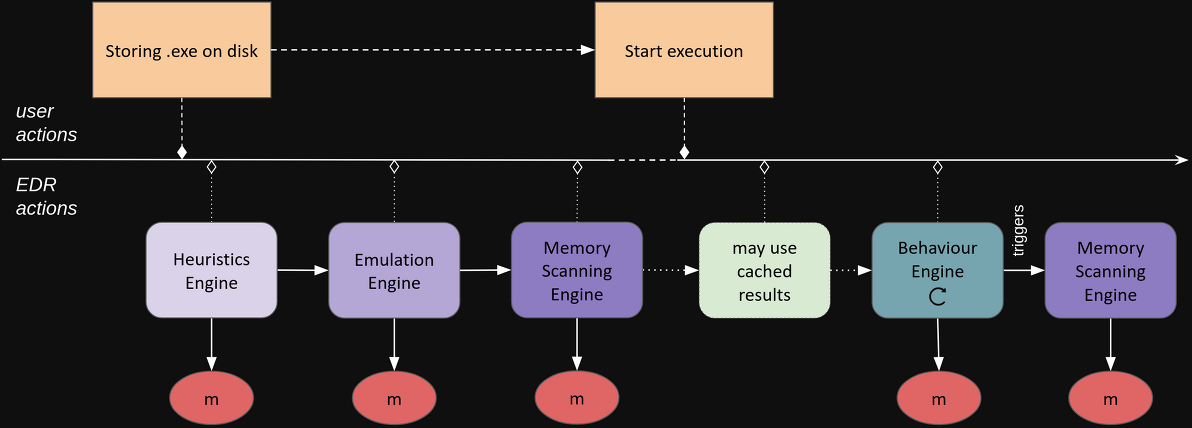
Storing on Disk (pre execution)
- The heuristics engine tries to match your executable to known bad signatures, like hashes, imphashes, yara rules, etc.
- The emulation engine emulates the file and stops (freezes) after a certain cutoff (may be from 0.1sec to 3sec).
- The memory scanning engine reads the memory of the emulated process and again tries to match it to known bad signatures.
Start Execution
- The EDR may repeat steps 1-3, or use cached results (known good or known bad) before starting the actual executable.
- The behaviour engine continously tracks the executable via the emitted ETW events (or obsolete: via its syscalls with hooks).
- When suspicious behaviour is encountered, the executable is either directly marked as malware, or another memory scan is conducted.
Conclusion
To be undetected, your malware "just" needs to bypass these detections. Do not do overfancy stuff, this is detected again.
- Change static signatures, use a loader, obfuscate strings. Have a look at AvRed.
- Use an anti-emulator if you decrypt or do malicious stuff in the first few seconds.
- Do some deconditioning, so that your future malicious actions are no longer tracked or your memory is scanned. See Decondition Everything.